
Key takeaways: NextGIS Web Community Edition (CE) is an open source, officially supported Docker image that lets any team deploy a fully functional NextGIS Web instance on their own infrastructure – in a single command, with no licensing fees.
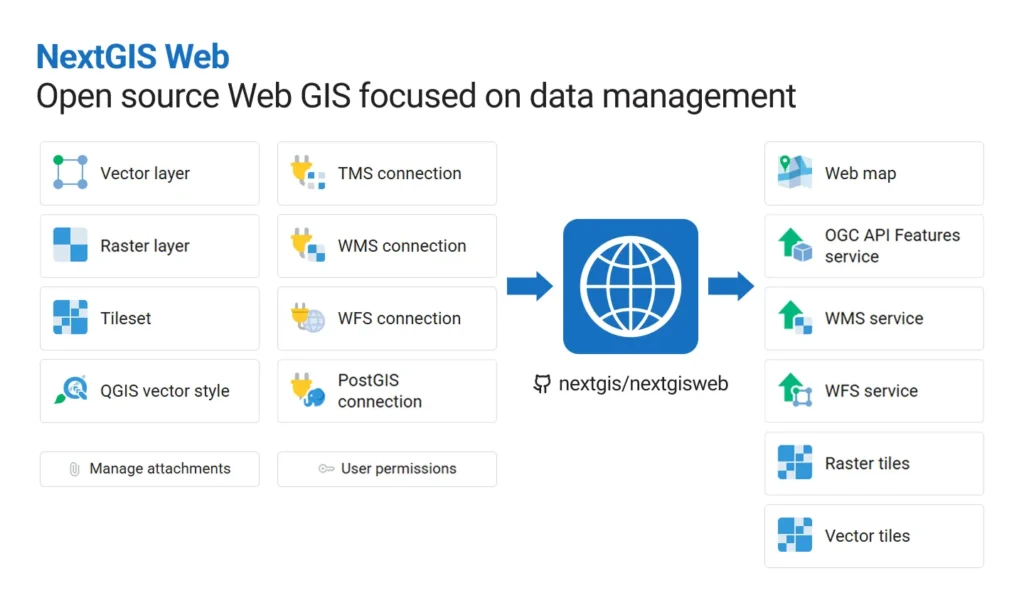
NextGIS Web serves two connected purposes:
As a spatial data hub, it gives your team a single central place for vector and raster geodata: to upload or create datasets, manage them through a browser interface or API, and expose data through web maps, tiles, OGC services, and a REST API. As a result, your datasets quickly become interactive maps available to colleagues, partners, or the public – and can be integrated with other systems.
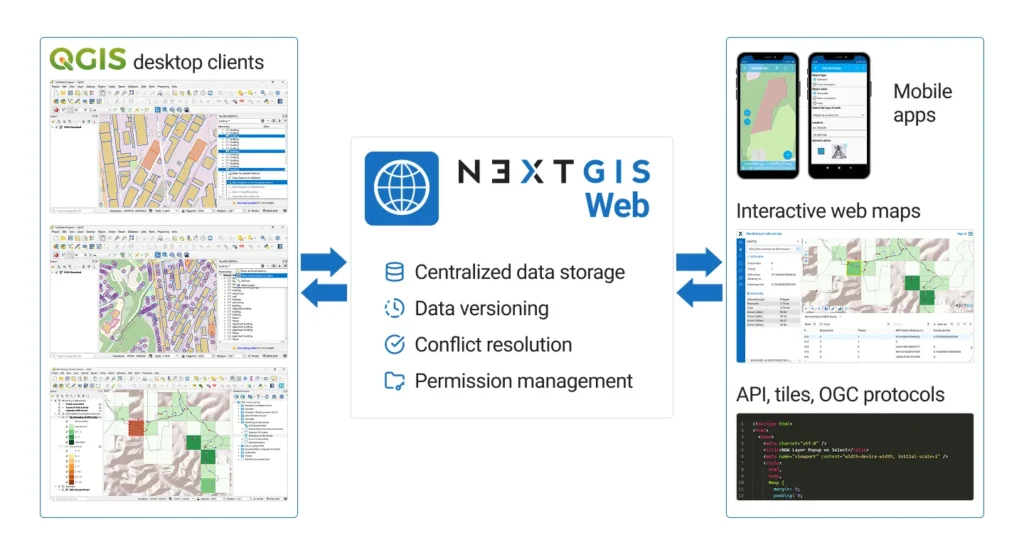
As a QGIS teamspace HQ, it works as a server for QGIS-based teams: multiple users can work on the same datasets, projects are stored centrally, and edits are synchronized and tracked. Designed for collaborative editing, NextGIS Web offers advanced permission management and provides built-in version control for vector data.
Both of these sets of functions are available through NextGIS Web Community Edition.
NGW is actively developing for 12 years and has always been open-source. But building and deploying it from source required hands-on server expertise that put it out of reach for most teams.
NextGIS Web Community Edition changes that. It’s an official Docker-based setup that packages everything needed to run NextGIS Web into a single public image. No build process, no dependency management, no configuration guesswork.
To launch a fully functional NextGIS Web instance using a public Docker image, just run:
docker run --name ngw_ce -dp 8080:8080 -v ngw_ce:/opt/crater/data nextgis/nextgisweb-ce:26.07.0 server
Then enjoy NextGIS Web, available at localhost:8080.
Docker Compose setup instructions are available in the repository.
| Feature | Community Edition |
| Spatial data storage and management | ✅ |
| Web map publishing | ✅ |
| QGIS symbology support | ✅ |
| QGIS Teamspace (multi-user editing, sync, version control) | ✅ |
| REST API, WMS/WFS/OGC API – Features services, XYZ and MVT tiles | ✅ |
| Vector layer version history with rollback and branching | ✅ |
| Access control and permission management | ✅ |
| NextGIS Mobile integration | ✅ |
| NextGIS Collector, Tracker, Toolbox integration | ❌ (paid plans) |
| Extensions: Galleries, Formbuilder, 3D and other | ❌ (paid plans) |
| Direct support | ❌ (only community forum) |
| Professional deployment | ❌ (paid plans) |
NextGIS Web Community Edition is the right product for you if:
If you don’t want to manage your own server, need professional deployment for reliable operation, require high-level support from the developers, or need additional functionality like NextGIS Collector, Tracker, or Toolbox, these options require a cloud subscription or an on-premise deployment.
Ready to deploy?
New to NextGIS platform? Check out our quick-start tutorials!
Found a bug or want to share feedback?
Need more than Community Edition provides? If you need additional components (Collector, Tracker, Toolbox), professional deployment, or developer support:
Compare NextGIS Web to other popular open-source Web GIS solutions:
Is NextGIS Web Community Edition free?
Yes, for any purpose.
Can I deploy NextGIS Web Community Edition on my computer?
Yes, as long as your device supports Docker and it is installed. It runs on the same hardware as any Docker-supported environment.
Is it possible to deploy NextGIS Web Community Edition on a VDS/VPS and assign a domain name to it?
Yes. Most virtual server providers support Docker-based deployments.
Can I build QGIS collaboration workflows based on NextGIS Web Community Edition?
Yes. All QGIS Teamspace functionality is available. QGIS project publishing, edit synchronization, data version control with rollback and branching, and conflict resolution are all included.
What’s not included in Community Edition?
Components outside the core NextGIS Web application: NextGIS Collector, NextGIS Tracker, NextGIS Toolbox, and some custom extensions such as Galleries.
Can I get support for NextGIS Web Community Edition?
The NextGIS Community Forum is the primary support channel for Community Edition users (no guaranteed response). Professional support requires a paid plan, which is available with a cloud subscription or an on-premise deployment.
There is functionality I need that is missing. Is custom development available?
Yes, we are open to custom development projects and funded feature implementation. Contact us.


