
QGIS is a powerful GIS tool, but standard setups break down when more than one person works on the same data.
NextGIS Platform – a combination of NextGIS Web and NextGIS Connect – adds an open source server layer to QGIS that is useful for individual users: centralized storage, web publishing, mobile sync, and version control are all available from a solo subscription.
When multiple users share access, those same capabilities become the foundation of a QGIS Teamspace: a synchronized, multi-user environment where teams work on the same data in real time.
QGIS is one of the most powerful desktop GIS tools available today. It excels at data analysis, cartography, and flexible workflows. But when it comes to team collaboration, typical QGIS setups quickly reach their limits:
This is where NextGIS Platform comes in, adding a server layer that extends QGIS beyond the desktop. Individual users benefit from centralized storage, version control, and web publishing. This article focuses on what becomes possible when a team shares that infrastructure: a synchronized, multi-user environment built on the same platform.
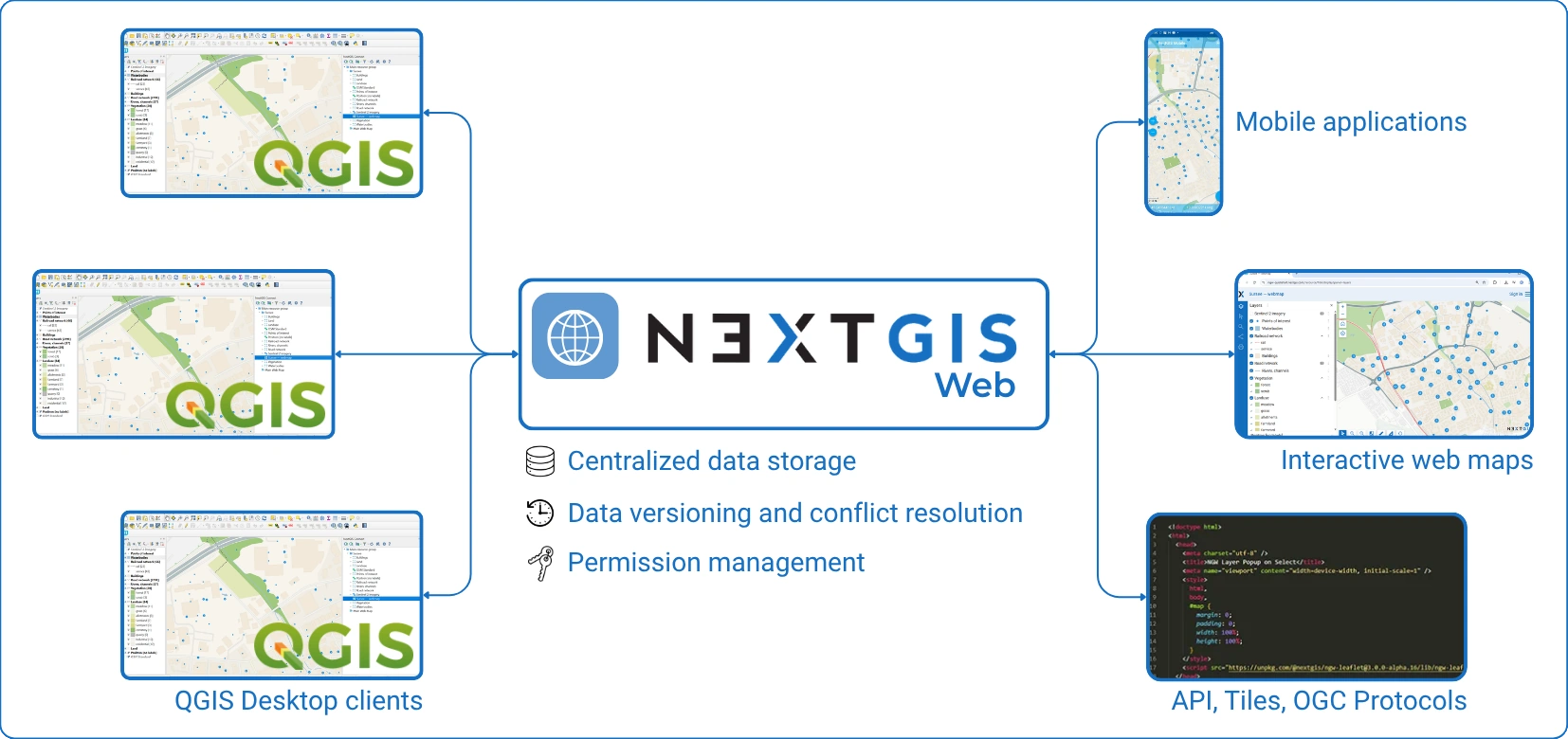
At the core of this transformation is NextGIS Web + NextGIS Connect, enabling teams to work on the same data, maps, and workflows in a synchronized environment.
Built by a team with 10+ years of involvement in QGIS development, authors of 30+ public plugins, including the most widely used one.
Most NextGIS Platform capabilities – centralized storage, version control, web publishing, and mobile integration – are available to individual QGIS users on any subscription tier. What changes when multiple users share access is that these capabilities become shared: a single source of truth that everyone on the team can access, edit, and publish from simultaneously.
This is a QGIS Teamspace, available on Premium cloud, on-premise installations, and the community edition.
In a QGIS Teamspace:
Instead of exchanging files, teams interact with a single source of truth.
Let’s walk through a realistic scenario. The municipality monitors infrastructure conditions. The team includes Analysts (QGIS power users), Field surveyors (mobile data collection) and Managers (web map consumers).
Analysts store .qgz locally. Data is shared via email or network folders. Conflicts appear when two people edit the same layer. Web maps require separate publishing tools.
The team spends a lot of time and effort to keep everything in sync. Any demonstration to stakeholders or the public involves days of intensive preparations.
Using NextGIS Connect, you can publish a QGIS project directly to a Web GIS.
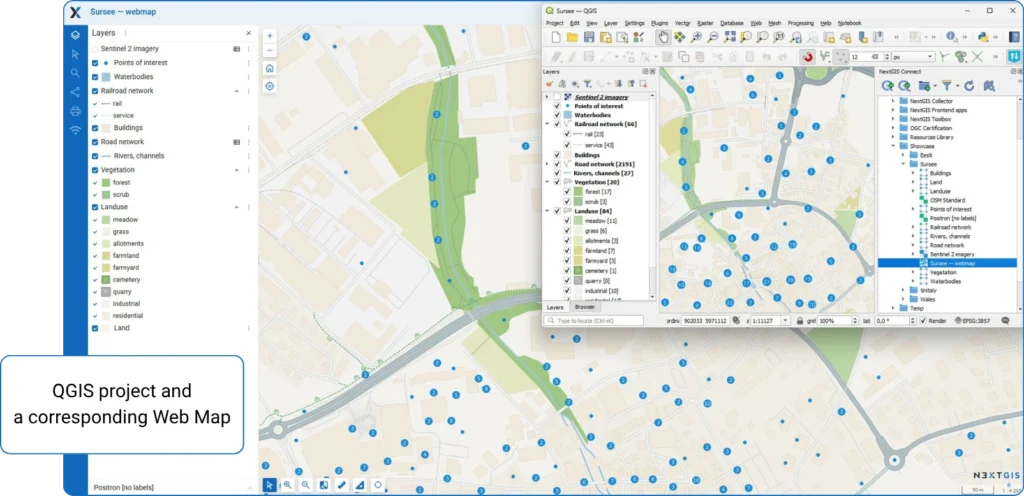
What happens under the hood:
There are no export pipelines, and no manual service configuration. One button to share the QGIS project as it is.
Using NextGIS Connect, other team members can open the same project from the server and work with the same layers in the same context.
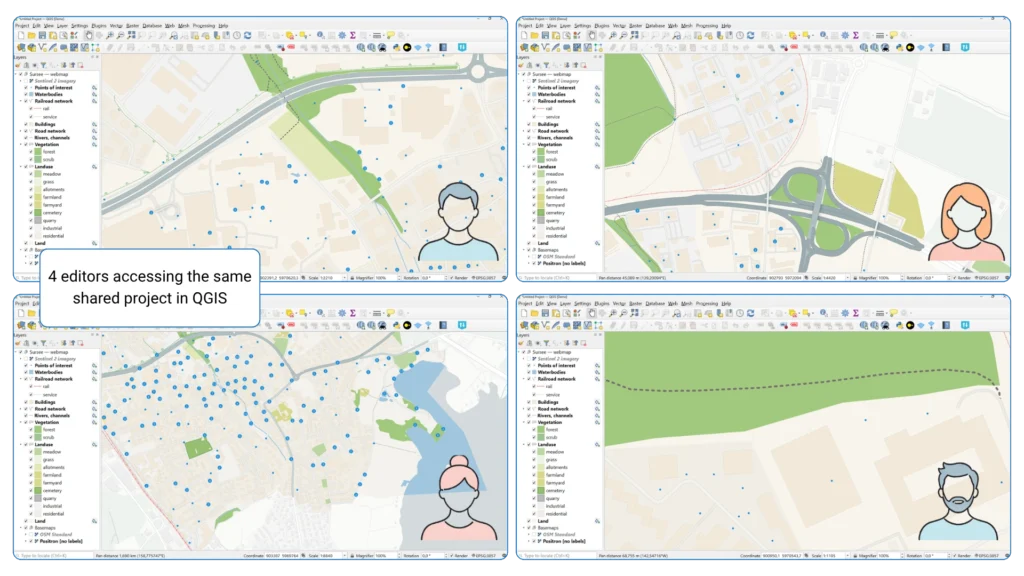
This effectively turns QGIS into a multi-user environment. Integration supports connecting web maps back into QGIS as full projects.
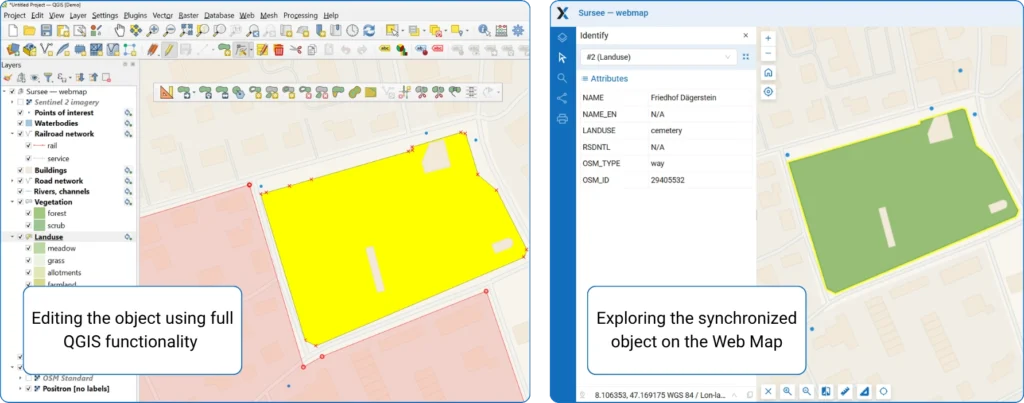
Now the key part – editing. With NextGIS Platform:
There is a direct sync supported by NextGIS Connect. Edits made in QGIS are instantly reflected in Web GIS.
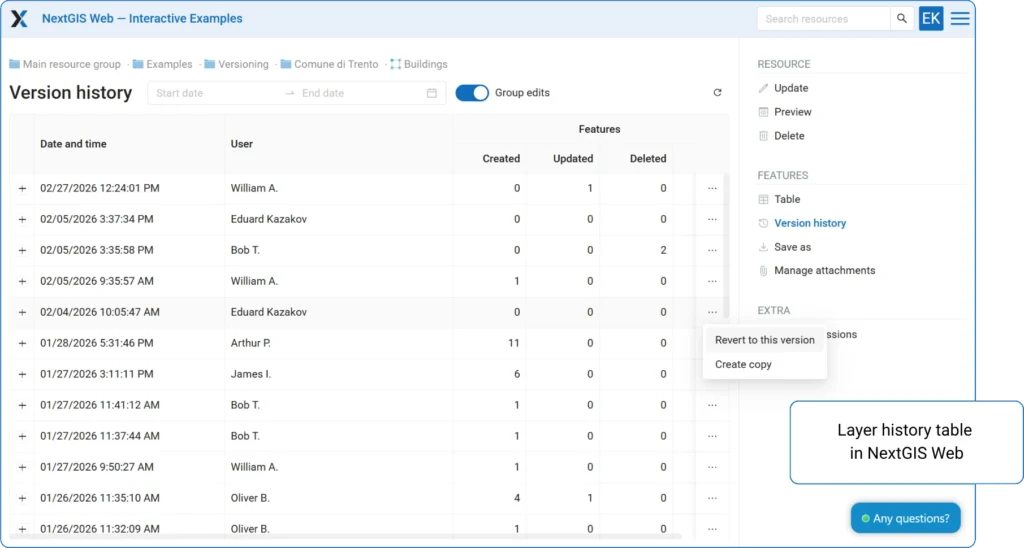
In real teams, conflicts are inevitable. A lot of editors work independently and touch the same data. NextGIS provides:
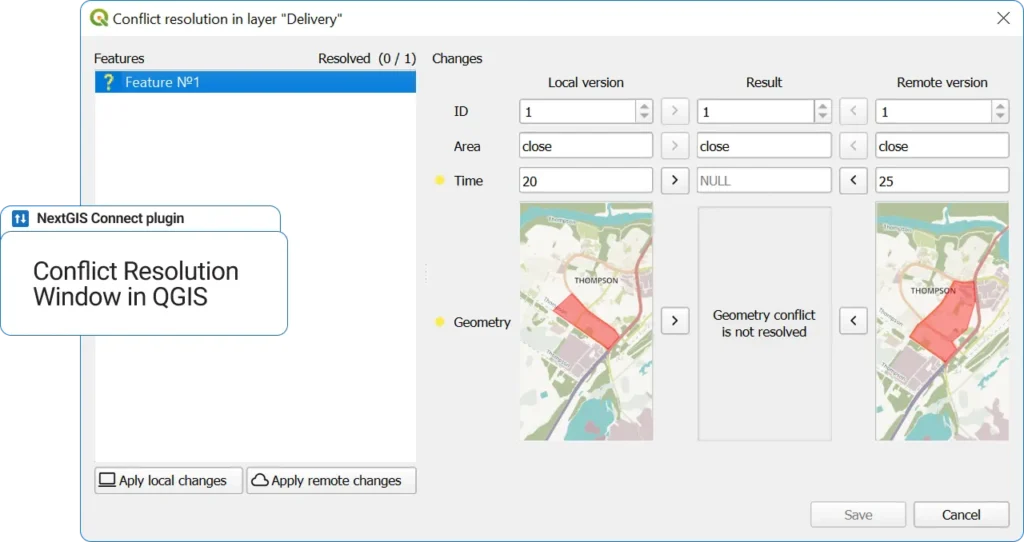
This is where enterprise-level becomes real: you don’t just edit, but you manage the data life cycle.
Once the QGIS project is published, managers can access it as a map in the browser. No QGIS required, and permissions control visibility and editing are available.
Published project data could also be published as a raster and vector tiles, WMS, WFS, OGC API – Features protocols.
In general, the same dataset powers:
Everything is keeped in sync automatically.
NextGIS Platform also includes mobile apps. Field teams can collect data via them, sync directly into the same datasets and work offline.
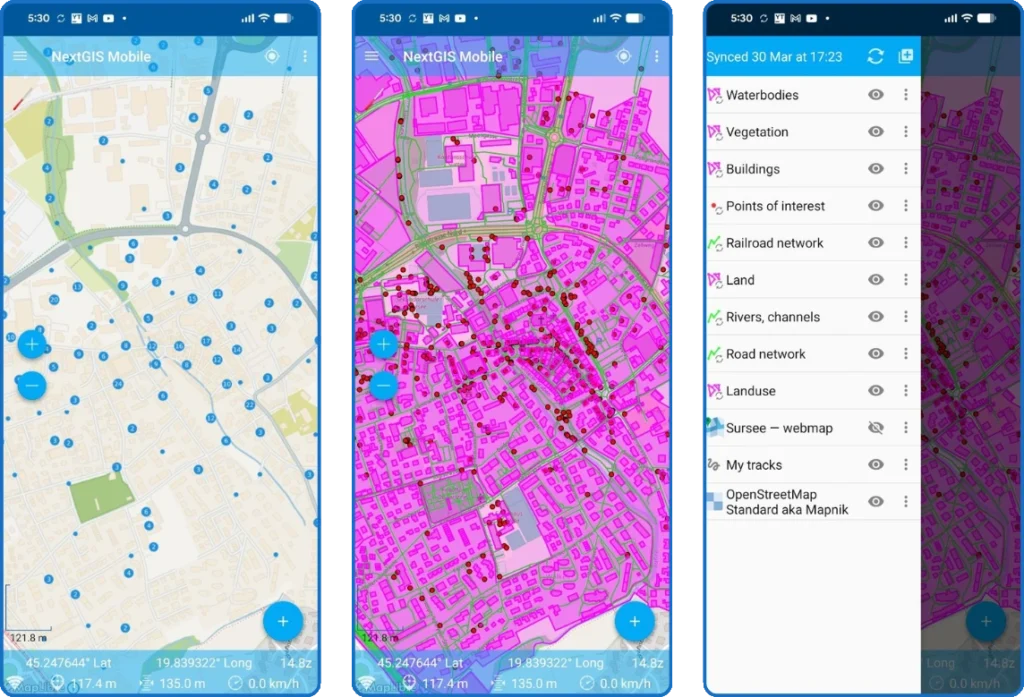
Data flows seamlessly into the same teamspace used by analysts.
| Aspect | Traditional QGIS | QGIS + NextGIS Platform |
| Data storage | Local / shared folders | Centralized server |
| Collaboration | Manual | Real-time / synchronized |
| Editing | Risk of conflicts | Managed with versioning and conflict resolution system |
| Publishing | Separate step | Built-in (web maps + OGC services and tiles) |
| Web access | External tools needed | Native |
| Mobile integration | via QField with manual files copying | Integrated with automatic sync across all devices |
For teams, this means: no more “latest version” confusion, no broken styles between users, no duplication of datasets, faster onboarding of new team members, direct bridge between analysis and delivery.
QGIS stops being a desktop tool and becomes a collaborative platform.
NextGIS Platform adds value from the moment a solo user connects QGIS to a server. A full QGIS Teamspace – with shared access and multi-user editing – becomes critical when:
NextGIS Platform doesn’t replace QGIS, it extends it into a team environment. By combining QGIS (analysis & editing), NextGIS Web (server & collaboration) and NextGIS Connect (integration layer), you get a full-stack collaborative GIS.
NextGIS Platform introduces several critical building blocks:
1. Seamless QGIS integration
2. Real-time synchronization
3. Version control for geodata
4. Unified resource model
5. Open standards
NextGIS Platform turns QGIS into a true team workspace by centralizing data, projects, and styles in a shared environment with real-time synchronization and version control. It eliminates file-based workflows and enables seamless collaboration across desktop, web, and mobile in a single, consistent system.
What is a QGIS Teamspace?
A QGIS Teamspace is what NextGIS Platform becomes when multiple users share access to the same server. Centralized storage, version control, web publishing, and mobile sync are available on any subscription tier – Teamspace is what happens when a team shares those resources, with edits synchronizing in real time against a single dataset. Available on Premium cloud, on-premise, and the upcoming community edition.
Does NextGIS Platform replace QGIS?
No – it extends QGIS. QGIS remains the tool for analysis, cartography, and desktop editing. NextGIS Web provides the server backbone; NextGIS Connect is the plugin that links the two. The platform adds infrastructure for server-backed and multi-user workflows without changing how QGIS works.
Do all team members need QGIS installed?
No. QGIS is required only for desktop-level analysis or editing. Users who only need to view maps or review data can access published web maps in a browser, with permissions controlling what each user can see and edit.
Is NextGIS Platform useful for individual QGIS users, or only for teams?
Both. Solo users get centralized storage, version control, web publishing, and mobile integration on a single-user subscription. Shared editing, real-time sync, and conflict resolution become active when the subscription supports multiple seats.
How does NextGIS handle editing conflicts when multiple users edit the same layer?
NextGIS Web tracks all changes by user and timestamp, detects conflicts from concurrent edits, and supports rollback to earlier versions. Teams can compare conflicting edits and choose which to keep.
Can field teams work offline with NextGIS?
Yes. NextGIS mobile apps support offline data collection with automatic sync once connectivity is restored. Field edits flow into the same dataset used by desktop and web users – no manual file transfers needed.
Is NextGIS available as cloud or on-premise?
Both. The cloud-hosted version is available via my.nextgis.com; on-premise runs on the organization’s own infrastructure. Both options include Teamspace features at the appropriate subscription level.
How is this different from using QField with a shared network folder?
A shared folder is a file-based workflow – conflicts are managed manually and there is no version history. NextGIS Platform replaces files with a server-backed data model with built-in conflict detection and rollback. The difference becomes especially significant with three or more concurrent users.
When does a team actually need a QGIS Teamspace?
When more than two or three people work on overlapping datasets, when consistent map appearance across users matters, or when field and office workflows need to stay in sync. Also when stakeholders require access to current maps on demand, without waiting for an analyst to export and distribute them.


