
We’re happy to announce a new addition to NextGIS services: our own Overpass API server, providing an alternative endpoint for querying OpenStreetMap (OSM) data.
Overpass API is one of the most useful tools in the OpenStreetMap ecosystem. It allows users to extract specific geographic features based on their location, tags, and attributes, without downloading entire OSM datasets.
Whether you need to find buildings, roads, administrative boundaries, or points of interest, Overpass API makes it possible to retrieve exactly the data you need.
Overpass API is widely used by GIS professionals, researchers, developers, and OpenStreetMap contributors.
Public Overpass instances are shared among many users and applications. Depending on server load, queries may take longer than expected, time out, or fail because a server is temporarily unavailable.
To provide our users with another option, we have deployed our own Overpass API instance, operated by NextGIS.
The new service offers an additional endpoint for accessing OpenStreetMap data, reducing dependence on the availability of individual public Overpass servers.
It uses the familiar Overpass API interface, so there is no need to learn a new query language or change the way you work with OSM data.
NextGIS Overpass API can be used for a wide range of GIS tasks:
Access to NextGIS Overpass API is provided through your NextGIS account.
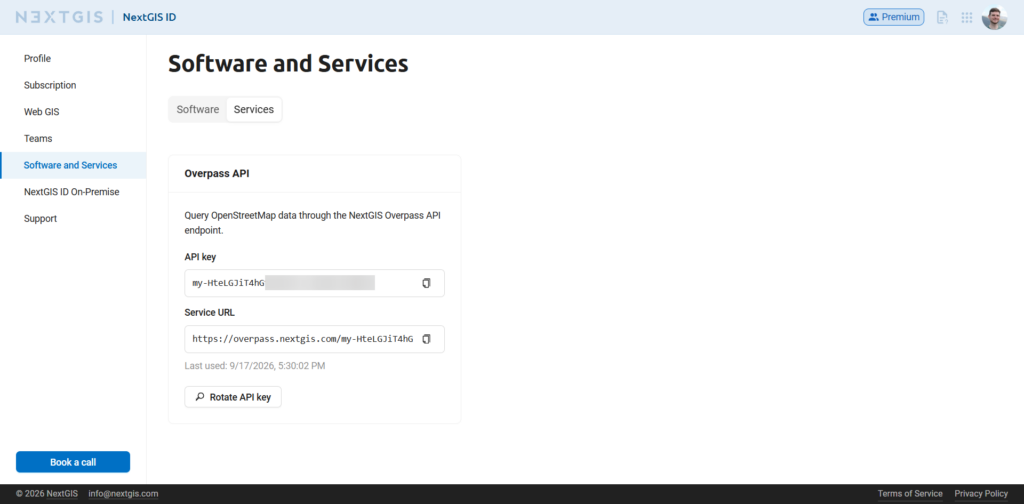
Detailed instructions are available in our documentation.
Let’s find all schools within a 2 km radius of particular location.
[out:json][timeout:25];
nwr["amenity"="school"](around:2000,45.2551,19.8452);
out center;
This query searches for OSM nodes, ways, and relations tagged amenity=school within the specified radius and returns the results in JSON format.
You can execute it using any HTTP client, such as cURL, Python, or Postman.
For example, using cURL:
curl -X POST \
  --data-urlencode 'data=[out:json][timeout:25];nwr["amenity"="school"](around:2000,45.2551,19.8452);out center;' \
  'YOUR_NEXTGIS_OVERPASS_URL'
Replace YOUR_NEXTGIS_OVERPASS_URL with the personal Overpass endpoint provided in your NextGIS account.
The query is sent as an HTTP POST request, with Overpass QL encoded in the data form parameter. The server responds with JSON containing the matching OSM objects and their attributes.
Alternatively, you can use an HTTP GET request, passing the same query as a URL-encoded data parameter:
curl -G \
  --data-urlencode 'data=[out:json][timeout:25];nwr["amenity"="school"](around:2000,45.2551,19.8452);out center;' \
  'YOUR_NEXTGIS_OVERPASS_URL'
We recommend POST for longer or more complex queries, as it avoids URL length limitations.
You can adapt the query to retrieve other OSM features, such as buildings, roads, shops, or hospitals, by changing the tags and geographic search area.
One convenient way to use the new service is through NextGIS OSMInfo, our QGIS plugin for exploring OpenStreetMap data directly from the map canvas.
OSMInfo allows you to identify OSM objects at any location, inspect their attributes, search for specific features, and save the results as vector layers.
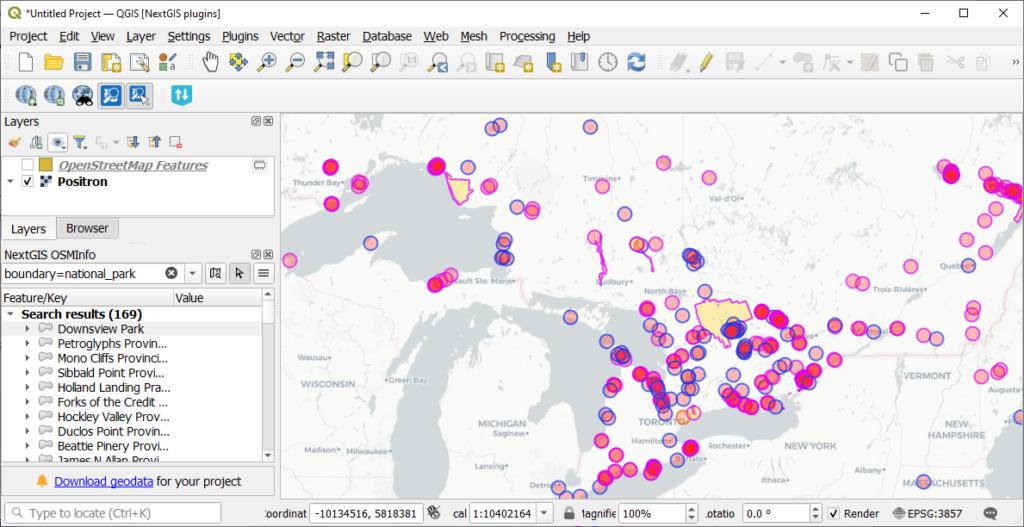
The plugin supports multiple Overpass API instances, including custom endpoints.
To connect it to our new service, open Settings → Options → NextGIS → OSMInfo in QGIS. In the Overpass instance settings, select Custom Overpass API instance, paste the URL generated in your NextGIS account, and click OK.
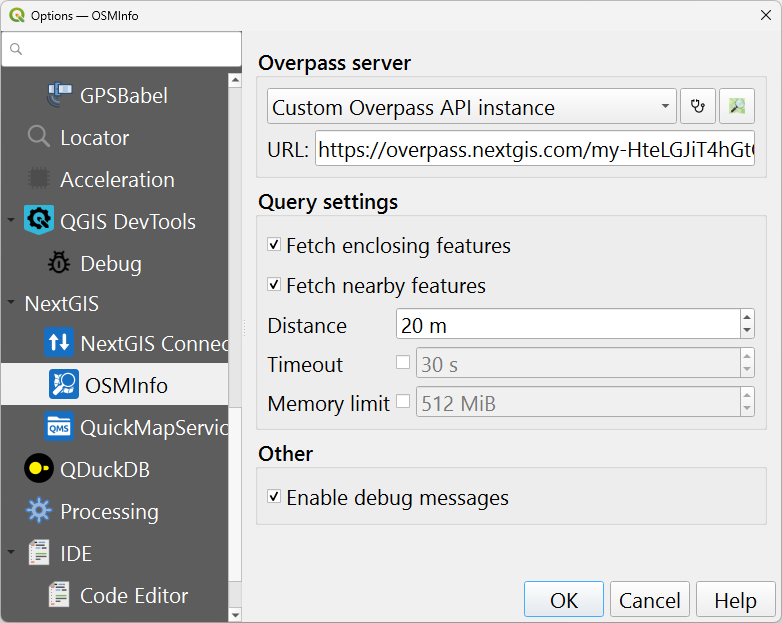
You can now use OSMInfo with NextGIS Overpass API as its data source.
For more information, see the OSMInfo documentation.
At NextGIS, we believe that convenient access to open geospatial data is an essential part of a productive GIS workflow. Our new Overpass API instance complements the existing NextGIS ecosystem of tools and services for finding, processing, managing, and publishing geodata.
Try NextGIS Overpass API in your next GIS project!
Get your API key | Read the documentation
Help keep our services free! Upgrade to Mini or Premium.


