
Whether you need a basemap in seconds, a fully styled map for print, an offline cache for the field, or a shared tile server for your whole organization – the NextGIS platform and native QGIS tools cover every scenario. The right choice depends on what you need the basemap to do: how it will be delivered, who will use it, and whether an internet connection will be available.
This article reflects the state of the QGIS basemap ecosystem as of May 2026, including major updates to QuickMapServices and QTiles presented at QGIS Open Day in April 2026.
| Your situation | Approach | Key tool | Works offline? |
| Need a basemap immediately, no configuration | Streaming raster tiles | QuickMapServices | No |
| Need to style or brand the basemap | Vector tile service | QuickMapServices (vector tiles) | No |
| Need an offline basemap for a specific territory | Pre-built tile download | NextGIS Data Tiles | Yes |
| Need an offline basemap rendered from your own QGIS project | Local tile cache | QTiles 2 | Yes |
| Serving a consistent basemap to your whole team | Self-hosted tile server | NextGIS GeoServices | Yes (air-gapped) |
| Need a government or institutional layer | Check QMS catalog first; direct connection if not listed | QuickMapServices or QGIS native | Depends on source |
| Have a specific service URL to connect directly | XYZ Tiles or WMS/WMTS | QGIS native | No |
When QGIS users search for basemap help, they usually land on a tutorial explaining how to add a specific type – XYZ tiles, WMS, a plugin. What’s harder to find is an answer to the earlier question: which approach should I be using in the first place?
The answer depends almost entirely on what you need the basemap to do. Format and protocol matter less than workflow. The sections below walk through each situation, from the simplest to the most infrastructure-heavy.
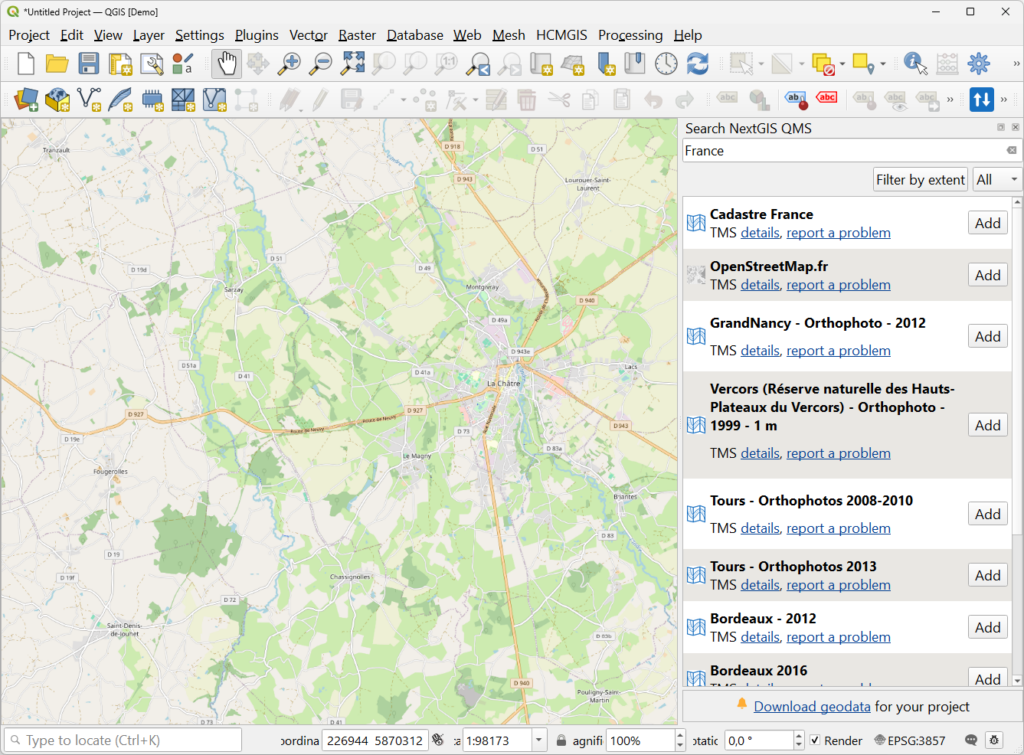
Best for: General mapping, quick projects, any connected workflow where you need geographic context fast.
QuickMapServices (QMS) is the most-downloaded plugin in the QGIS ecosystem, with 11 million installs. Install it, search for a service, and add it with a single click. No URLs to copy, no parameters to configure.
The catalog at qms.nextgis.com contains 650+ publicly available services – OpenStreetMap, satellite imagery, terrain, and dozens of thematic layers contributed by the community. As of the April 2026 update, the contributor pack is included by default. Previously, you had to navigate to Settings and manually download it; now everything is available immediately after installation.
QMS services are web-based and require an active internet connection. For offline scenarios, see Options 3 and 4 below.
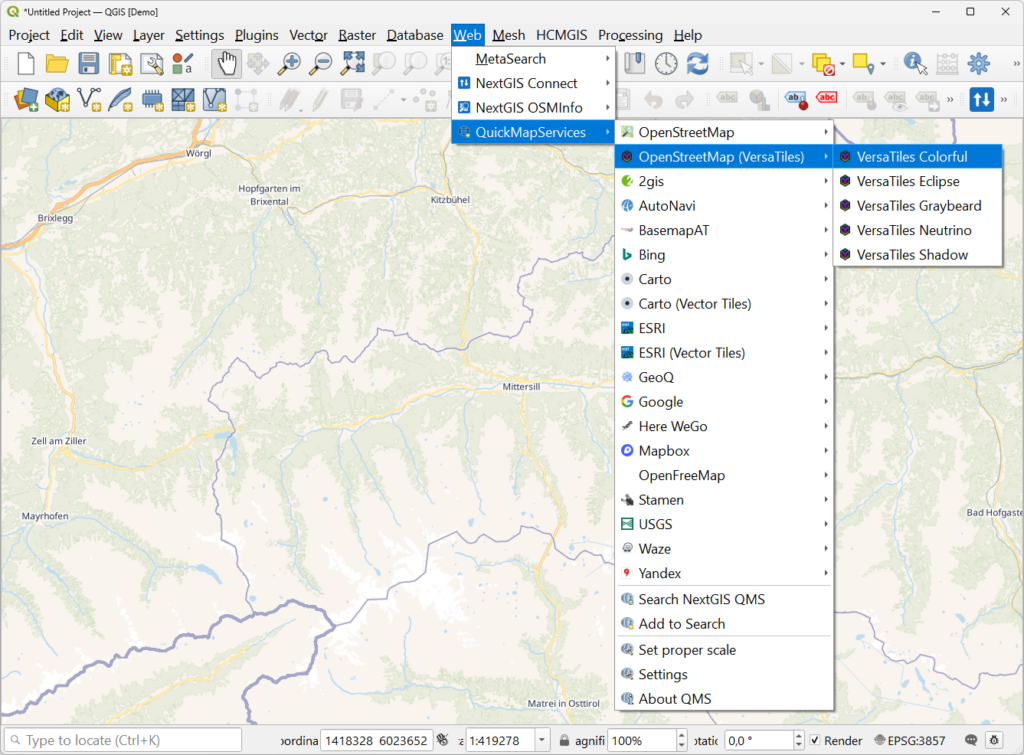
Best for: Print layouts, branded map products, and maps where the basemap colors or labels need to match your design requirements.
The same QMS update that bundled the contributor pack also introduced something more significant: vector tile basemaps – including OpenStreetMap VersaTiles and others – are now available directly from the plugin.
The practical difference from raster tiles is meaningful. With a raster basemap, you get what the service delivers: colors, label sizes, and font choices are baked in. With a vector tile basemap, styling is applied by QGIS locally. Open the Symbology panel of any connected vector tile layer and you can adjust colors, hide elements, or match the map to your organization’s palette – no additional tools, no code.
This matters most for print work. Raster tiles bake labels and icons at screen resolution, so in a high-DPI print layout they come out small. Vector tiles render at any resolution because text and geometry stay as data until QGIS draws them.
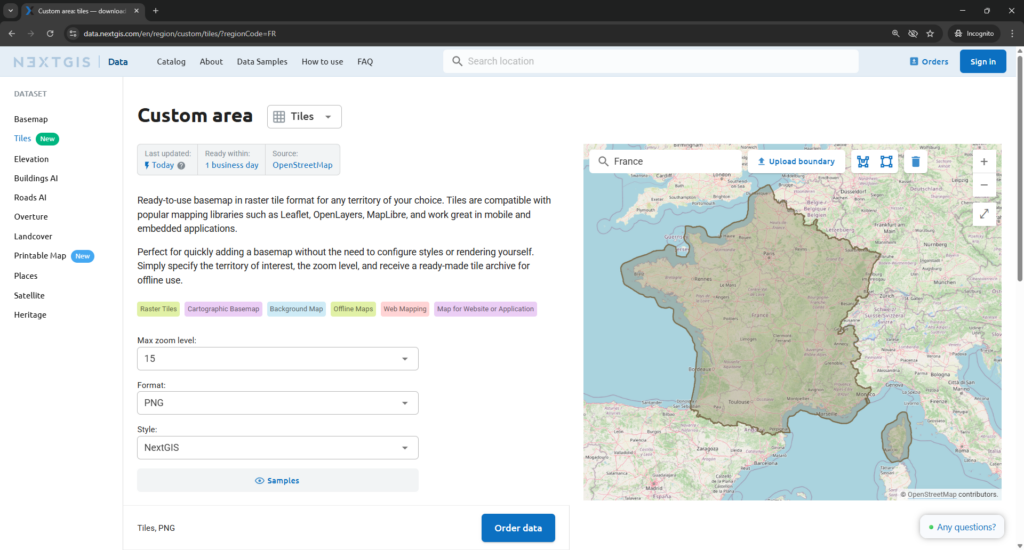
Best for: Field deployments where you need an offline-ready basemap for a defined area quickly, without generating tiles from a QGIS project.
NextGIS Data Tiles, available at data.nextgis.com, provides pre-built downloadable basemap tile packages. The workflow is three steps: pick a territory, select zoom levels, and download. The result works offline immediately – no QGIS project required, no tile rendering, no setup.
The basemap is built on the OpenStreetMap database and updated daily. It covers 30 data categories including administrative boundaries, road network, buildings, water features, and points of interest.
This is the right option when you need an offline basemap fast for a city, region, or country – and you’re not starting from a custom QGIS symbology. If you need the basemap to reflect your own data or styling, use QTiles 2 instead (see Option 4).
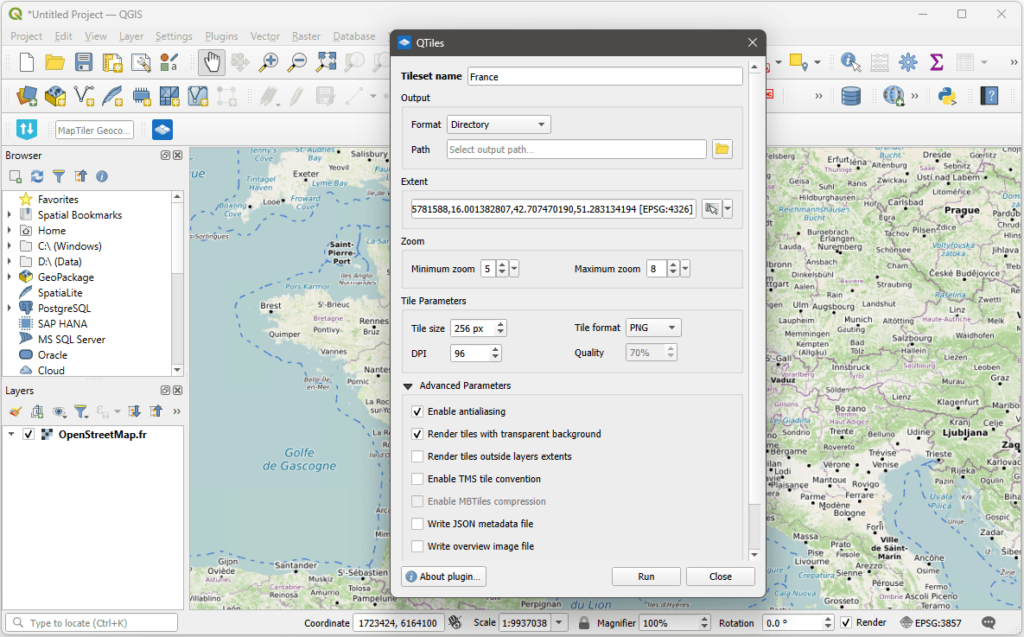
Best for: Field data collection, low-connectivity environments, mobile GIS deployments, and any workflow requiring a tile cache that matches your project’s own symbology.
When you need a basemap that doesn’t depend on a live connection and it needs to match your project’s symbology, rule-based styles, or multi-scale settings, the right approach is to render the tile cache yourself. QTiles 2, released in April 2026, is the tool for this.
QTiles renders a tile pyramid from your QGIS project and exports it in your choice of format:
Two additions in QTiles 2 are worth highlighting. The zoom level helper lets you set your tile range by zooming to your start and end scales in QGIS and clicking “set current zoom level,” removing the guesswork around which zoom numbers correspond to which scale. The extent options now include “visible layers extent” and “full project extent” – neither of which is available in QGIS’s built-in tile export – giving you more precise control over what gets generated.
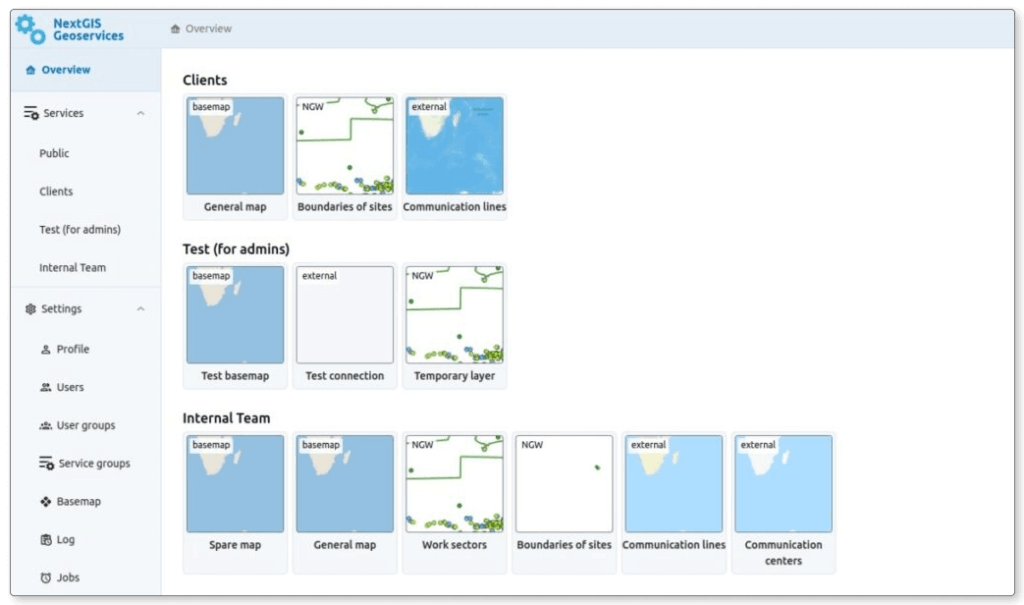
Best for: Organizations where multiple teams need a consistent basemap layer; environments where external internet access is restricted or unavailable.
When a basemap has to be accessible across your entire organization – desktop, browser, and mobile – without depending on a public third-party service, you need a tile server you control.
NextGIS GeoServices is a self-hosted tile server that runs inside your own infrastructure. It can generate and serve:
Access is managed through user groups with configurable permissions, and the server operates in air-gapped networks with no external dependency. Deployment is Docker-based and runs on standard Linux distributions (Ubuntu, Debian, and CentOS Stream).
This is the natural progression for organizations that have moved from individual QGIS work to shared, team-wide spatial infrastructure. See NextGIS GeoServices details and pricing.
Best for: National mapping agency data, cadastral layers, environmental datasets, and other authoritative sources published as web services.
The QMS catalog already includes a large number of government and institutional services – national topographic layers, cadastral data, environmental monitoring feeds, and regional mapping agency tiles contributed by users around the world. Before reaching for a manual connection, it’s worth searching the catalog by territory or provider name. Many services are already there, and adding them through QMS means they’re available across any QGIS project without reconfiguring the URL each time.
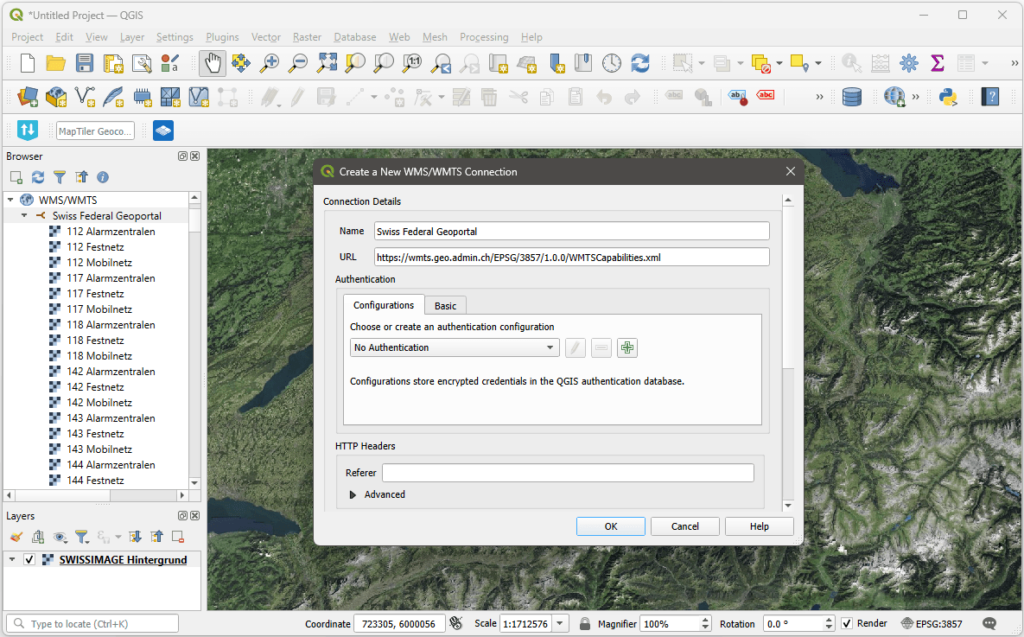
If the service you need isn’t in the catalog, you have two options. You can add the service to the QMS catalog yourself – once contributed, it’s accessible in any project via the plugin and available to other users who need the same source. Or you can connect directly in QGIS via Layer → Add Layer using the service URL from the source organization. QGIS supports WMS, WMTS, and XYZ connections natively with no plugin required.
The practical advantage of the QMS path – even for institutional data – is reusability. A service configured once in the catalog is one click away in every future project.
Can I use QuickMapServices offline? No. QMS services are web-based and require an active internet connection. For offline use, either download a pre-built tile package from NextGIS Data Tiles, or render a cache with QTiles 2 before heading into the field.
What’s the difference between NextGIS Data Tiles and QTiles 2? NextGIS Data Tiles provides a pre-built downloadable basemap for a specific territory – no QGIS project required. QTiles 2 renders a tile cache from your own QGIS project, preserving your custom symbology, rule-based styles, and multi-scale settings. Use Data Tiles when you need an off-the-shelf offline basemap fast; use QTiles 2 when the offline basemap needs to reflect your project’s own data and styling.
What’s the difference between MBTiles and PMTiles? Both are single-file tile containers. MBTiles is a SQLite-based format with broad support across GIS tools. PMTiles is a newer format designed for serving tiles directly from cloud storage without a dedicated tile server. QTiles 2 supports both; QGIS’s built-in tile export currently supports MBTiles only.
Can I customize the appearance of a QMS vector tile basemap? Yes. After adding a vector tile service through QMS, open the layer’s Symbology settings in QGIS. You can adjust colors, hide specific layers, and modify label styles directly – no external tool required.
When does it make sense to use NextGIS GeoServices instead of QMS? QMS is the right starting point for most QGIS workflows. GeoServices becomes the right choice when you need organization-wide access to a consistent basemap, when your network is air-gapped or restricted, or when you need tiles generated from your own data rather than a public catalog.
Do I need an account to use QuickMapServices? No. QMS is free and open-source. The plugin, the catalog, and the contributor pack require no registration.
Can I use vector tiles for print layouts? Yes – and this is one of their main advantages over raster tiles. Because labels and icons in vector tiles are rendered by QGIS at display time, they scale correctly at print resolution. Raster tile labels are baked in at screen DPI and appear small in high-resolution print layouts.
What output formats does QTiles 2 support? QTiles 2 exports to directory tiles, MBTiles, PMTiles, and NextGIS Mobile format.
The government service I need isn’t in the QMS catalog – what are my options? Two paths. You can connect to it directly in QGIS via Layer → Add Layer → Add WMS/WMTS Layer (or XYZ Tiles for raster tile services) using the URL from the source organization. Alternatively, add the service to the QMS catalog at qms.nextgis.com – once contributed, it’s available in any QGIS project through the plugin and can be found by other users who need the same source.


